How much do you hate getting your stuff ready so you can do your taxes? Rather have a broken leg, right?
“There has to be an easier way,” you say?
Well, kind of. The IRS hasn't made tax filing any simpler – it's just that tools like ChatGPT can take some of the stress out of the process.
However, don't get the bright idea that ChatGPT (or Claude, Gemini, Perplexity) is a replacement for a CPA. Think of it more like a very patient assistant who’s good at explaining things and helping you stay organized.
From this reporter's own trial-and-error tests with doing my own taxes, I probably shaved 5-6 hours off what it normally takes me.
Just be aware of this: AI isn't a perfect machine and can make mistakes. Asking "Are you sure?" doesn't offend the machine if you're not sure its response is accurage, so don't be shy.
Creating a simple, senior-friendly checklist
We'll start at the top of the stress chain where one of the biggest headaches in tax prep is just gathering everything.
ChatGPT (Claude, et al) can build a personalized checklist based on your situation (married filing solo/joint, small business, etc.) such as:
- Social Security benefits (SSA-1099)
- Pension or retirement income (1099-R)
- Investment income (1099-INT, 1099-DIV)
- Medical expenses (especially important for seniors)
- Property tax and mortgage interest
- Charitable donations
Copy and paste this prompt:
“Create a simple tax preparation checklist for me.
I am [single/married], filing [jointly/separately], and my income includes [Social Security, pension, investments, small business, etc.].
Include all documents and records I should gather, especially anything commonly missed by retirees.
Keep it simple and easy to follow.”
Example add-ons (to make it even smarter)
You can refine it with a quick follow-up:
“Highlight which items are most important for someone over 65.”
“Flag anything that could reduce my taxes.”
“Put this into a printable checklist format.”
Pro Tip (should have you even more time later in this process)
Add this line to your prompt:
“Organize the checklist in the order I’ll likely need it when filing.”
 Smart Senior Daily Staff
The role of interpreter
There are some confusing tax form terms that were written for bean counters, not everyday Joe's and Jill's – AGI, Above-the-Line Deductions, AMT, Refundable and Nonrefundable Credits for example.
That's one place where an AI engine can step in and translate what the term means and actually wants you to put in.
If you run into a term that makes your eyes glaze over, copy and paste this prompt:
“Explain this tax term in plain English for a beginner: [INSERT TERM].
Tell me what it means, why it matters, and where I might see it on my tax forms.
If possible, give a simple real-life example.”
A good AI machine can even dig deep and pull together things it thinks make sense for the answers you're seeking.
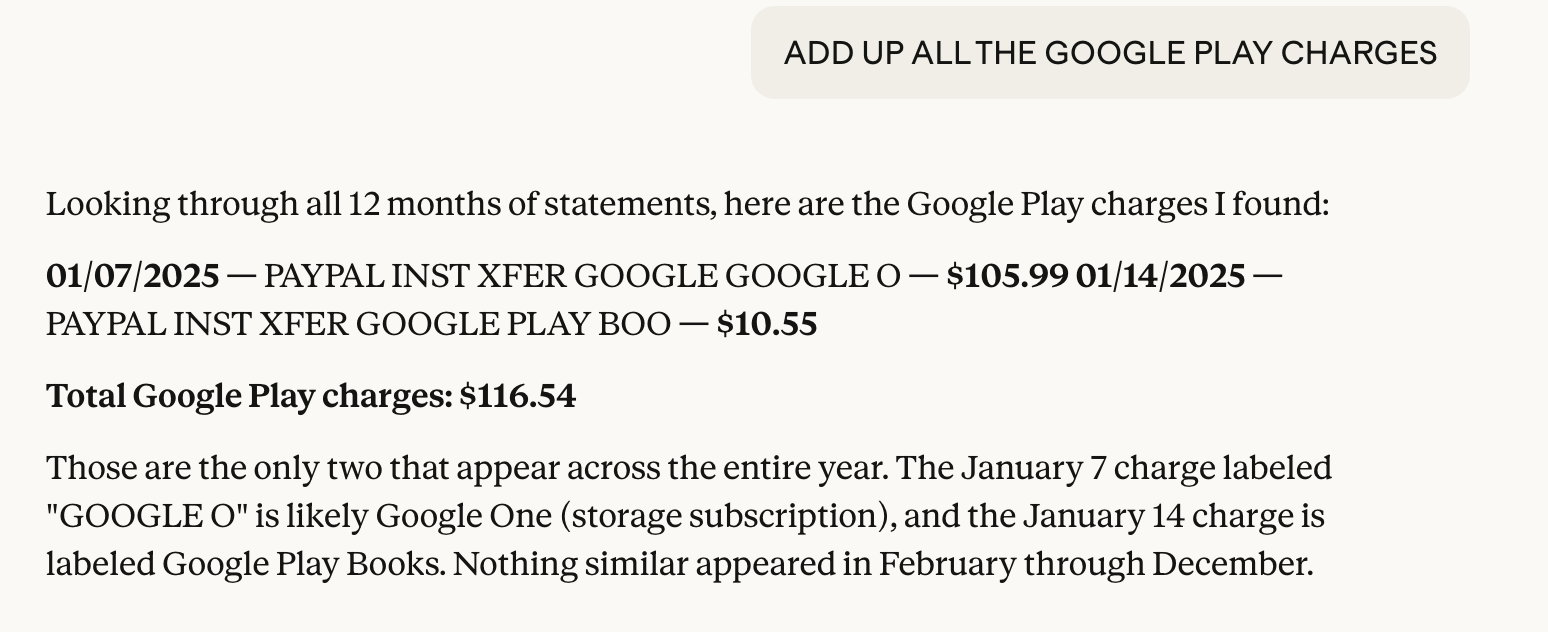
Plus, it does a great job asking for clarification – especially when it's not sure about one of your prompts/questions. For example, this one when Claude was asked to "add up all the Google Play charges"...
Hide & seek
If you're anything like me, you've got year-enders from two really dense sources: your credit card and your bank statements.
Typically, I print out every one, highlight what's important, put it on a spreadsheet, etc.
This time, though, I uploaded all of my bank's statements into Claude and started looking for totals from certain companies, e.g. my utility bill ("Add up the total charges for "XYZ Gas & Electric." Fifteen seconds later, it was all there.
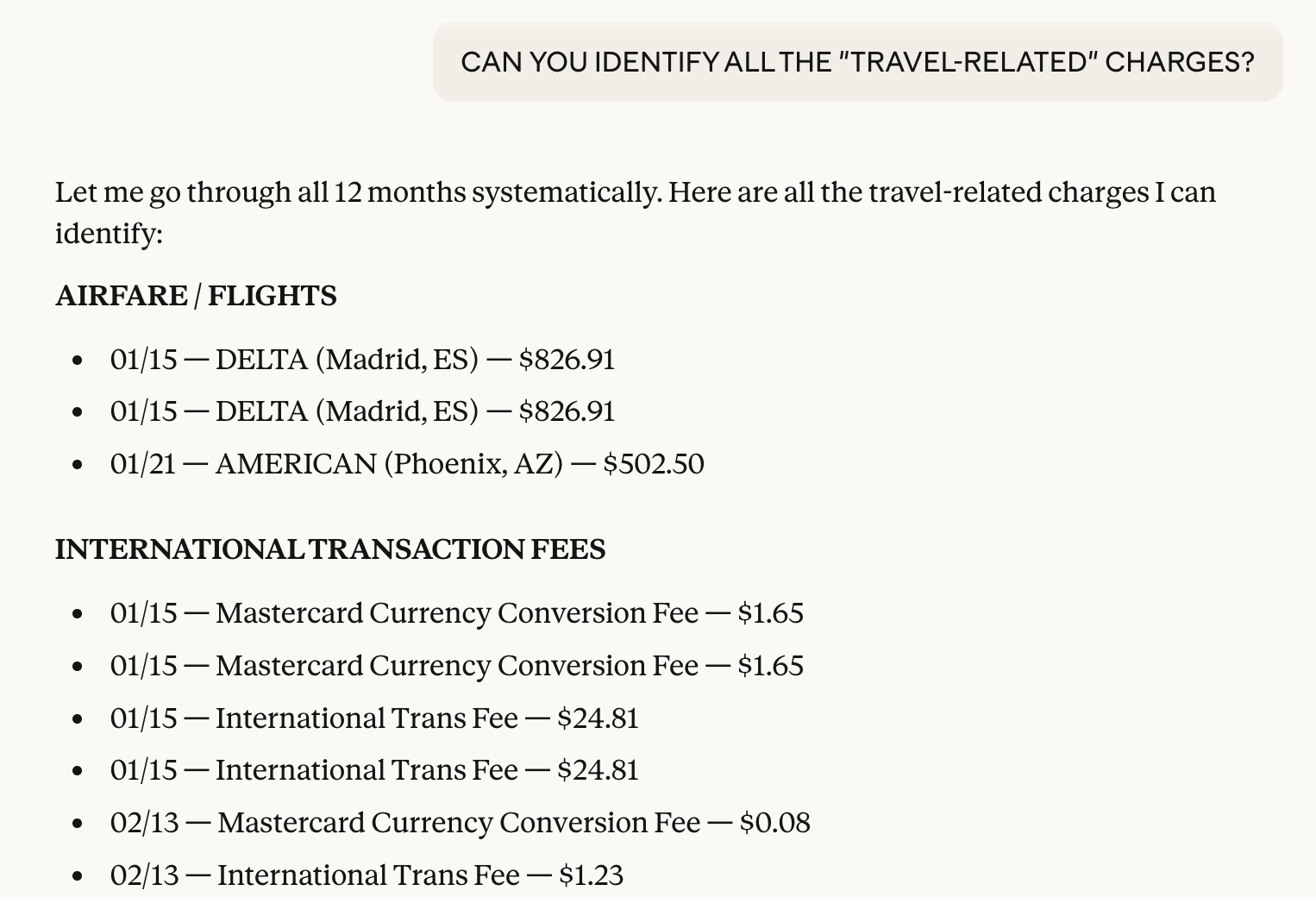
Then, I asked it to go through everything and let me know what items it thought I might be able to use for business expenses, donations, homeowner fees, insurance, medical, etc. Again, in under a minute, I had a complete breakout.
Like this when I was looking for "travel expenses"...
Copy and paste this prompt:
**“I’m uploading my bank/credit card statements.
Please scan them and:Add up total spending for these categories: [utilities, medical, insurance, donations, etc.]List totals for specific companies (like [XYZ Gas & Electric]).Flag any expenses that might be tax-deductible or worth reviewing.Present everything in a simple summary I can use for tax prep.”**
Instead of digging through IRS instructions, you can ask:
“What does this line on my 1040 mean?”
“Do I qualify for the standard deduction in 2026?”
And get a straight answer without the legal mumbo jumbo.
 Smart Senior Daily Staff
Find deductions that you might otherwise miss
Even experienced filers overlook tax breaks. Let ChatGPT/Claude/Gemini scan your situation and suggest what’s worth a second look.
Copy and paste this prompt:
“Based on my situation, what tax deductions or credits might I be missing?
I am [age], filing as [single/married], and my income includes [Social Security, pension, investments, etc.].
I have expenses such as [medical bills, property taxes, charitable donations, home improvements, etc.].
Please list possible deductions or credits I should look into, explain them in plain English, and tell me who typically qualifies.”
Smart follow-ups
Once you get these results back, drill down with:
“Which of these are most commonly missed by people over 65?”
“Which ones could have the biggest impact on my taxes?”
“What documentation would I need to claim these?”
Add this line to keep things grounded:
“Only include deductions that are legitimate under current IRS rules — no gray areas.”
Where AI helps — and where it can hurt your retirement
Sorting receipts, explaining unfamiliar terms, and helping make sense of complicated forms is something AI does well. But when it comes to the decisions that actually shape your financial future, that’s where things can start to go sideways.
When Smart Senior Daily reached out to Brennan Kolar, financial analyst and founder of Atlas CPA Index, he said that anyone using AI to help sort out tax-related items needs to remember that those things belong in two buckets – one that AI does well; one not so well.
“AI is good at organizing receipts and explaining confusing terms,” Kolar said. “But it fails on the planning side — and for retirees, that is a huge problem.”
One of the clearest examples is how AI handles Social Security taxes — a topic that trips up even seasoned filers.
“Whether your benefits are taxable depends on your provisional income,” he explains. “That’s a formula that adds half of your Social Security benefits to your other income — and most AI tools don’t apply it correctly.”
Instead, some tools mistakenly treat the full benefit as taxable or ignore the formula altogether.
“It gives you a number that looks right,” Kolar commented. “And unless you know the formula yourself, you would never catch it.”
The same pattern shows up with Medicare — specifically IRMAA, the surcharge that can increase your Part B and Part D premiums.
“If your income crosses $103,000 as a single filer or $206,000 for a married couple, your premiums jump,” he says. “And the income used is from two years prior.”
That time lag is critical — and often missed.
“A Roth conversion you did in 2024 can raise your Medicare premiums in 2026 by $800 or more per year,” he notes. “AI misses that because it doesn’t connect those systems.”
What ties all of this together is something more subtle — and more concerning.
“The biggest risk of using AI is overconfidence in numbers you can’t verify,” he says. “The tool may sound confident, but it may be wrong — and if you don’t understand the calculation, you’re likely to trust it anyway.”
That doesn’t mean seniors should avoid AI altogether. Quite the opposite.
“The best use of AI is to organize your documents and translate confusing terms,” he says. “Then let someone who understands your situation handle the final decisions.”
In other words: AI is a great assistant — just not a financial planner.
Disclaimer: This article is for informational purposes only and should not be considered tax advice. Always consult a qualified tax professional or refer to IRS guidelines for your specific situation.